The @angular/cdk/menu module provides directives to help create custom menu
interactions based on the WAI ARIA specification.
By using @angular/cdk/menu you get all of the expected behaviors for an accessible
experience, including bidi layout support, keyboard interaction, and focus management. All
directives apply their associated ARIA roles to their host element.
The directives in @angular/cdk/menu set the appropriate roles on their host element.
| Directive | ARIA Role |
|---|---|
| CdkMenuBar | menubar |
| CdkMenu | menu |
| CdkMenuGroup | group |
| CdkMenuItem | menuitem |
| CdkMenuItemRadio | menuitemradio |
| CdkMenuItemCheckbox | menuitemcheckbox |
| CdkMenuTrigger | button |
The @angular/cdk/menu is designed to be highly customizable to your needs. It therefore does not
make any assumptions about how elements should be styled. You are expected to apply any required
CSS styles, but the directives do apply CSS classes to make it easier for you to add custom styles.
The available CSS classes are listed below, by directive.
| Directive | CSS Class | Applied... |
|---|---|---|
cdkMenu |
cdk-menu |
Always |
cdkMenu |
cdk-menu-inline |
If the menu is an inline menu |
cdkMenuBar |
cdk-menu-bar |
Always |
cdkMenuGroup |
cdk-menu-group |
Always |
cdkMenuItem |
cdk-menu-item |
Always |
cdkMenuItemCheckbox |
cdk-menu-item |
Always |
cdkMenuItemCheckbox |
cdk-menu-item-checkbox |
Always |
cdkMenuItemRadio |
cdk-menu-item |
Always |
cdkMenuItemRadio |
cdk-menu-item-radio |
Always |
cdkMenuTriggerFor |
cdk-menu-trigger |
Always |
Import the CdkMenuModule into the NgModule in which you want to create menus. You can then apply
menu directives to build your custom menu. A typical menu consists of the following directives:
cdkMenuTriggerFor - links a trigger element to an ng-template containing the menu to be openedcdkMenu - creates the menu content opened by the triggercdkMenuItem - added to each item in the menuMost menu interactions consist of two parts: a trigger and a menu panel.
You can add cdkMenuTriggerFor to any button to make it a trigger for the given menu, or any menu
item to make it a trigger for a submenu. When adding this directive, be sure to pass a reference to
the template containing the menu it should open. Users can toggle the associated menu using a mouse
or keyboard.
When creating a submenu trigger, add both cdkMenuItem and cdkMenuTriggerFor like so,
There are two types of menus:
You can create menus by marking their content element with the cdkMenu or cdkMenuBar
directives. You can create several types of menu interaction which are discussed below.
All type of menus should exclusively contain elements with role menuitem, menuitemcheckbox,
menuitemradio, or group. Supporting directives that automatically apply these roles are
discussed below.
Note that Angular CDK provides no styles; you must add styles as part of building your custom menu.
An inline menu is a menu that lives directly on the page rather than in a pop-up associated with a
trigger. You can use an inline menu when you want a persistent menu interaction on a page. Menu
items within an inline menus are logically grouped together, and you can navigate through them
using your keyboard. You can create an inline menu by adding the cdkMenu directive to the element
you want to serve as the menu content.
You can create pop-up menus using the cdkMenu directive as well. Add this directive to the
element you want to serve as the content for your pop-up menu. Then wrap the content element in an
ng-template and reference the template from the cdkMenuTriggerFor property of the trigger. This
will allow the trigger to show and hide the menu content as needed.
Menu bars are a type of inline menu that you can create using the cdkMenuBar directive. They
follow the ARIA menubar spec and behave similarly to a desktop application menubar. Each
bar consists of at least one cdkMenuItem that triggers a submenu.
A context menus is a type of pop-up menu that doesn't have a traditional trigger element, instead
it is triggered when a user right-clicks within some container element. You can mark a
container element with the cdkContextMenuTriggerFor, which behaves like cdkMenuTriggerFor except
that it responds to the browser's native contextmenu event. Custom context menus appear next to
the cursor, similarly to native context menus.
You can nest context menu container elements. Upon right-click, the menu associated with the closest container element will open.
In the example above, right-clicking on "Inner context menu" will open up the "inner" menu and right-clicking inside "Outer context menu" will open up the "outer" menu.
The cdkMenuItem directive allows users to navigate menu items via keyboard.
You can add a custom action to a menu item with the cdkMenuItemTriggered output.
You can create nested menus by using a menu item as the trigger for another menu.
A cdkMenuItemCheckbox is a special type of menu item that behaves as a checkbox. You can use this
type of menu item to toggle items on and off. An element with the cdkMenuItemCheckbox directive
does not need the additional cdkMenuItem directive.
Checkbox items do not track their own state. You must bind the checked state using the
cdkMenuItemChecked input and listen to cdkMenuItemTriggered to know when it is toggled. If you
don't bind the state it will reset when the menu is closed and re-opened.
A cdkMenuItemRadio is a special type of menu item that behaves as a radio button. You can use this
type of menu item for menus with exclusively selectable items. An element with the cdkMenuItemRadio
directive does not need the additional cdkMenuItem directive.
As with checkbox items, radio items do not track their own state, but you can track it by binding
cdkMenuItemChecked and listening for cdkMenuItemTriggered. If you do not bind the state the
selection will reset when the menu is closed and reopened.
By default cdkMenu acts as a group for cdkMenuItemRadio elements. Elements with
cdkMenuItemRadio added as children of a cdkMenu will be logically grouped and only a single item
can have the checked state.
If you would like to have unrelated groups of radio buttons within a single menu you should use the
cdkMenuGroup directive.
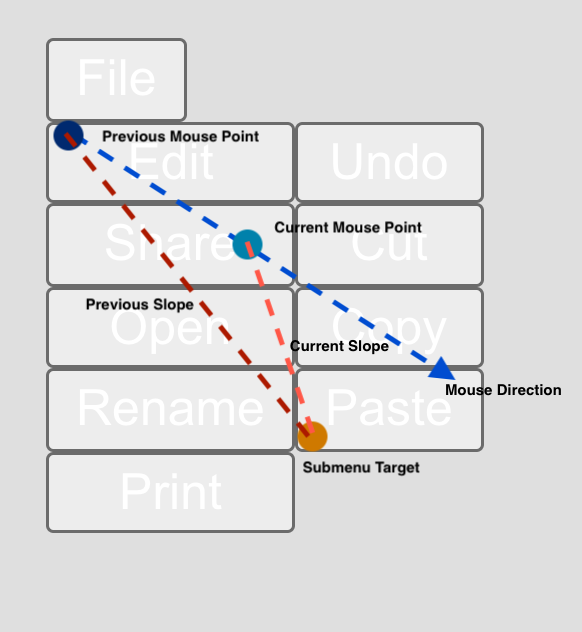
@angular/cdk/menu is capable of intelligently predicting when a user intends to navigate to an
open submenu and preventing premature closeouts. This functionality prevents users from having to
hunt through the open menus in a maze-like fashion to reach their destination. To enable this
feature for a menu and its sub-menus, add the cdkMenuTargetAim directive to the cdkMenu or
cdkMenuBar element.
As demonstrated in the diagram above we first track the user's mouse movements within a menu. Next, when a user mouses into a sibling menu item (e.g. Share button) the sibling item asks the Menu Aim service if it can perform its close actions. In order to determine if the current submenu can be closed out, the Menu Aim service calculates the slope between a selected target coordinate in the submenu and the previous mouse point, and the slope between the target and the current mouse point. If the slope of the current mouse point is greater than the slope of the previous that means the user is moving towards the submenu, so we shouldn't close out. Users however may sometimes stop short in a sibling item after moving towards the submenu. The service is intelligent enough to detect this intention and will trigger the next menu.
The set of directives defined in @angular/cdk/menu follow accessibility best practices as defined
in the ARIA spec. Specifically, the menus are aware of left-to-right and right-to-left
layouts and opened appropriately. You should however add any necessary CSS styles. Menu items should
always have meaningful labels, whether through text content, aria-label, or aria-labelledby.
Finally, keyboard interaction is supported as defined in the ARIA menubar keyboard interaction spec.